DIY reef-pi build log

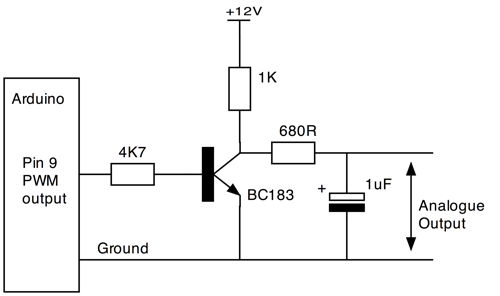
3231260959_859c185063_o.png


AFAICT most are basically like the above w/ its R/C filter circuit to smooth the output to analog..
Problem is it's reversed if I remember correctly..
Increasing duty cycle decreases voltage out..
not my forte.. but also pretty sure Kessil is 10V analog..

retail.. ;)
It's confusing.. :(
 
Last edited:
3231260959_859c185063_o.png


AFAICT most are basically like the above w/ its R/C filter circuit to smooth the output to analog..
Problem is it's reversed if I remember correctly..
Increasing duty cycle decreases voltage out..
not my forte.. but also pretty sure Kessil is 10V analog..

retail.. ;)
It's confusing.. :(
This circuit will create a triangual shape signal, a close approximation of an analog singla (some a DAC like ADS1115 will generate). While this helps, in my experience, 10V PWM works just fine for Kessil, as long as theres not other aberrations
 
@sjeff35 You should be able to use it with the lights circuit from Ranjib's guide. Here's how I think I would connect it.
kessil.png


The board oreo5457 linked should also work, but it seems a bit expensive for a single channel conversion. I think a single op amp can get very close to the desired signal too. I've been tinkering with milling circuits lately, and here's a 2 channel converter I'm working on. I'm still trying dial it in.
pwmToAnalog.jpg
 
@sjeff35 You should be able to use it with the lights circuit from Ranjib's guide. Here's how I think I would connect it.
kessil.png


The board oreo5457 linked should also work, but it seems a bit expensive for a single channel conversion. I think a single op amp can get very close to the desired signal too. I've been tinkering with milling circuits lately, and here's a 2 channel converter I'm working on. I'm still trying dial it in.
pwmToAnalog.jpg
This will be awesome. We dont have to deal with DACs then. It will be nice to even just have a breadboard based op amp circuit for others to learn.
 
This will be awesome. We dont have to deal with DACs then. It will be nice to even just have a breadboard based op amp circuit for others to learn.
That's a good idea. I'll also modify this design to be breadboard-friendly.
 
You two make me smile. About to start my ReefPi build, gathering information. Wonder if I can attach this to my HomeAssistant Web UI in the future....
 
You two make me smile. About to start my ReefPi build, gathering information. Wonder if I can attach this to my HomeAssistant Web UI in the future....
Folks have done something on this line. Check @sfgabe 's thread.
 
Folks have done something on this line. Check @sfgabe 's thread.
You definitely can. Anything that's available through reef-pi's API is available to home assistant through the rest sensor, including turning equipment off and on. Kudos to @Ranjib because so far the API integration has been flawless.
 
Oooh, all in one Home Assistant and Reefpi... I will definitely be doing this. Firing up the 3D printer now to create a bracket, may look into the api. So with this, I can use NodeRed to fire off items and be a second failsafe for notifications.
Eek, my brain is having a field day of possibilities now.
 
Oooh, all in one Home Assistant and Reefpi... I will definitely be doing this. Firing up the 3D printer now to create a bracket, may look into the api. So with this, I can use NodeRed to fire off items and be a second failsafe for notifications.
Eek, my brain is having a field day of possibilities now.
I've not used NodeRed but it should be fairly straightforward. Here's an example of the entry in sensors.yaml that gets the sysinfo:

Code:
- platform: rest
  name: ReefControlPiSysUptime
  username: !secret reefcontrolpi_username
  password: !secret reefcontrolpi_password
  authentication: basic
  json_attributes:
    - name
    - ip
    - uptime
    - cpu_temperature
    - version
  resource: http://reefcontrolpi.local/api/info
  headers:
      Connection: keep-alive
      content-type: application/json
      Referer: http://reefcontrolpi.local/
      Cookie: !secret reefcontrolpi_cookie

Feel free to dig through my HA github for clues. The !secret_cookie should be the full string with "AUTH=1234etc"
 
@sjeff35 You should be able to use it with the lights circuit from Ranjib's guide. Here's how I think I would connect it.
kessil.png


The board oreo5457 linked should also work, but it seems a bit expensive for a single channel conversion. I think a single op amp can get very close to the desired signal too. I've been tinkering with milling circuits lately, and here's a 2 channel converter I'm working on. I'm still trying dial it in.
pwmToAnalog.jpg


THANKS!

I got sidetracked on another project and didn't get any email updates on this thread so I just stumbled on this today!

I'll see if that works!
 
@Michael Lane on @Ranjib
Would adding a flow sensor be applicable for anyone else?
I just saw this one, I am fidgeting with my pump voltage to find what I can do with my Bean animal 1" setup today. It would be awesome to see actual GPM/GPH as well as a safety measure that if input=0 flip off said outlet for the pump.

I think this will be a project I would like to look into and possibly add to the Reef-Pi in some way...
 
As an Amazon Associate we earn from qualifying purchases.
I think that's interesting, but I'm not really sure what kinds of decisions it would drive. Maybe it could be used to alert me when I need to clean the pump due to a decrease in performance. It could also be used to notify if a pump fails.

It looks like that sensor is based on a hall effect sensor, so I think it would generate a series of pulses. The frequency would correlate to flow rate. I'm not sure how well linux would be able to count the pulses, but it sounds like a fun embedded project.
 
Hi all! One silly question, I will make build treat.. ok where do I connect ato 12v pump? In the hat? I know where float and optical sensor goes.. is it possible to connect sensor so optical powers up pump and turns it off. And foat is just emergency? If optical fails? Do I connect them in series? I read about this some time ago but cant find it. Ok but main question is where to power a pump? Tnx
 
@Matevz Savarin ATO is typically controlled as an Equipment connected to a relay outlet. You can wire the float sensors to be redundant, but I'm not sure that you could wire the optical sensors in redundant way. You could possibly set up the float as an inlet and trigger a macro to turn off the pump, disable ATO, and send a notification.
 
@Michael Lane on @Ranjib
Would adding a flow sensor be applicable for anyone else?
I just saw this one, I am fidgeting with my pump voltage to find what I can do with my Bean animal 1" setup today. It would be awesome to see actual GPM/GPH as well as a safety measure that if input=0 flip off said outlet for the pump.

I think this will be a project I would like to look into and possibly add to the Reef-Pi in some way...
You should totally try that. Reef-pi 3.0 has file based driver that you can use to read the flow values with your prototype code and just write it in a file , reef-pi can then read that value and tray it as ph or general purpose analog values that can be used to control any thing you want
 
As an Amazon Associate we earn from qualifying purchases.
Hi all! One silly question, I will make build treat.. ok where do I connect ato 12v pump? In the hat? I know where float and optical sensor goes.. is it possible to connect sensor so optical powers up pump and turns it off. And foat is just emergency? If optical fails? Do I connect them in series? I read about this some time ago but cant find it. Ok but main question is where to power a pump? Tnx
Use a 12v power adapter to directly power the pump and then control the power adapter as any other equipment in the ato module
 
@Michael Lane are you making any v3 boards in the future? I have your v2 board which I am very close to starting my reef pi build with it but I find i will be short on relay control. I will need at least 16 more relay control. I was thinking to just build a proto board with 2 - 2803. I don't think the v3 would help me as I already have the v2. Maybe someone out there is interested as well in the v3.
 
@Michael Lane are you making any v3 boards in the future? I have your v2 board which I am very close to starting my reef pi build with it but I find i will be short on relay control. I will need at least 16 more relay control. I was thinking to just build a proto board with 2 - 2803. I don't think the v3 would help me as I already have the v2. Maybe someone out there is interested as well in the v3.
Wow! That's a lot of relays!

I don't have plans for additional v3 boards. They don't add any functionality and the connectors are more fragile than the goby version. Plus, they take me almost 3 times as long to build and test one. I designed another board with a few new features, but it's quite labor intensive to build too. I'd love to get a pick and place machine if the tariffs are ever dropped.

Do you have to use 12v relays? reef-pi 3.0 added the ability to use PCA9685 outputs as equipment. If you can use logic level relays triggered by 3.3v or 5v, then you could use an additional PC9685 or 2 for the additional relays. Actually, even if you have to use 12v relays, it might be worth it to pair them with PCA9685s due to the number of GPIO that would otherwise be required.
 
When I bought the relays I didn't know the differences between trigger voltage. I will just have to supply the extra pca9685s with the 12v to trigger the relays. I am planning to use the excess relays to control a remote auto water change system.
 

IF YOU HAD TO TAKE A REEFING EXAM, WOULD YOU PASS?

  • Yes!

    Votes: 32 45.7%
  • Not yet, but I have one that I want to buy in mind!

    Votes: 9 12.9%
  • No.

    Votes: 26 37.1%
  • Other (please explain).

    Votes: 3 4.3%

New Posts

Back
Top