exposure advice

PedroYoung

Valuable Member
View Badges
Joined
Feb 12, 2014
Messages
2,029
Reaction score
3,069
Location
Chelsea, AL
Rating - 0%
0   0   0
I'm guessing this has to do with ISO, but lots of my shots have a "glare" from the LED lighting that shows up as just a bright splash on light colored coral tissue (like blues). Below is a pic I just took, ISO 100, F8. You can see the glare. That is a light blue. Any ideas on either post processing or settings? Using Canon T6i, shooting RAW, and using lightroom to set color temp.
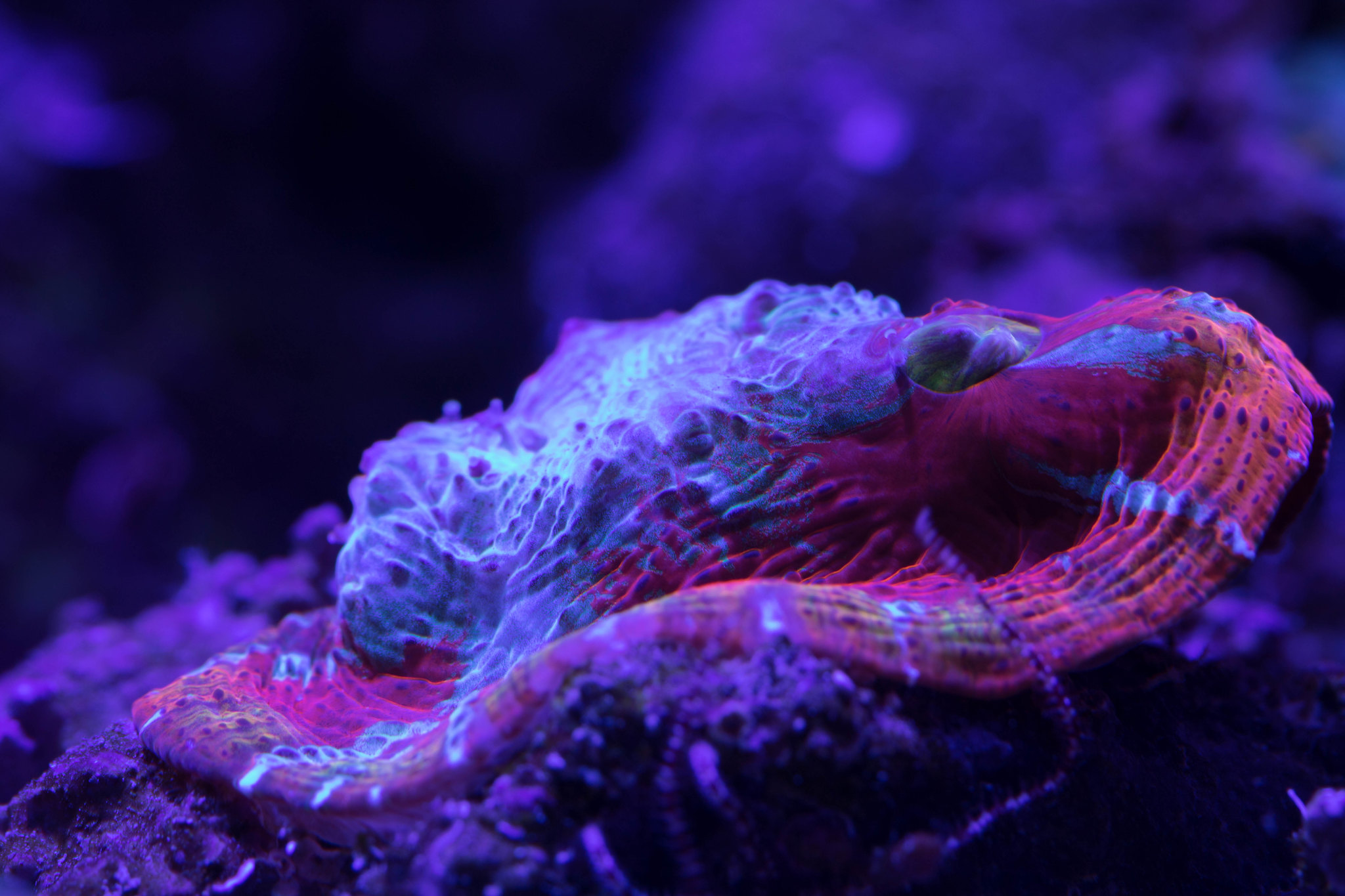
avenger 4 by Peter Young, on Flickr
 
I'm guessing this has to do with ISO, but lots of my shots have a "glare" from the LED lighting that shows up as just a bright splash on light colored coral tissue (like blues). Below is a pic I just took, ISO 100, F8. You can see the glare. That is a light blue. Any ideas on either post processing or settings? Using Canon T6i, shooting RAW, and using lightroom to set color temp.

avenger 4 by Peter Young, on Flickr
Can you easily indicate the "glare " you're refeeeing to? I see only three small spots wher the exposure has been clipped.
 
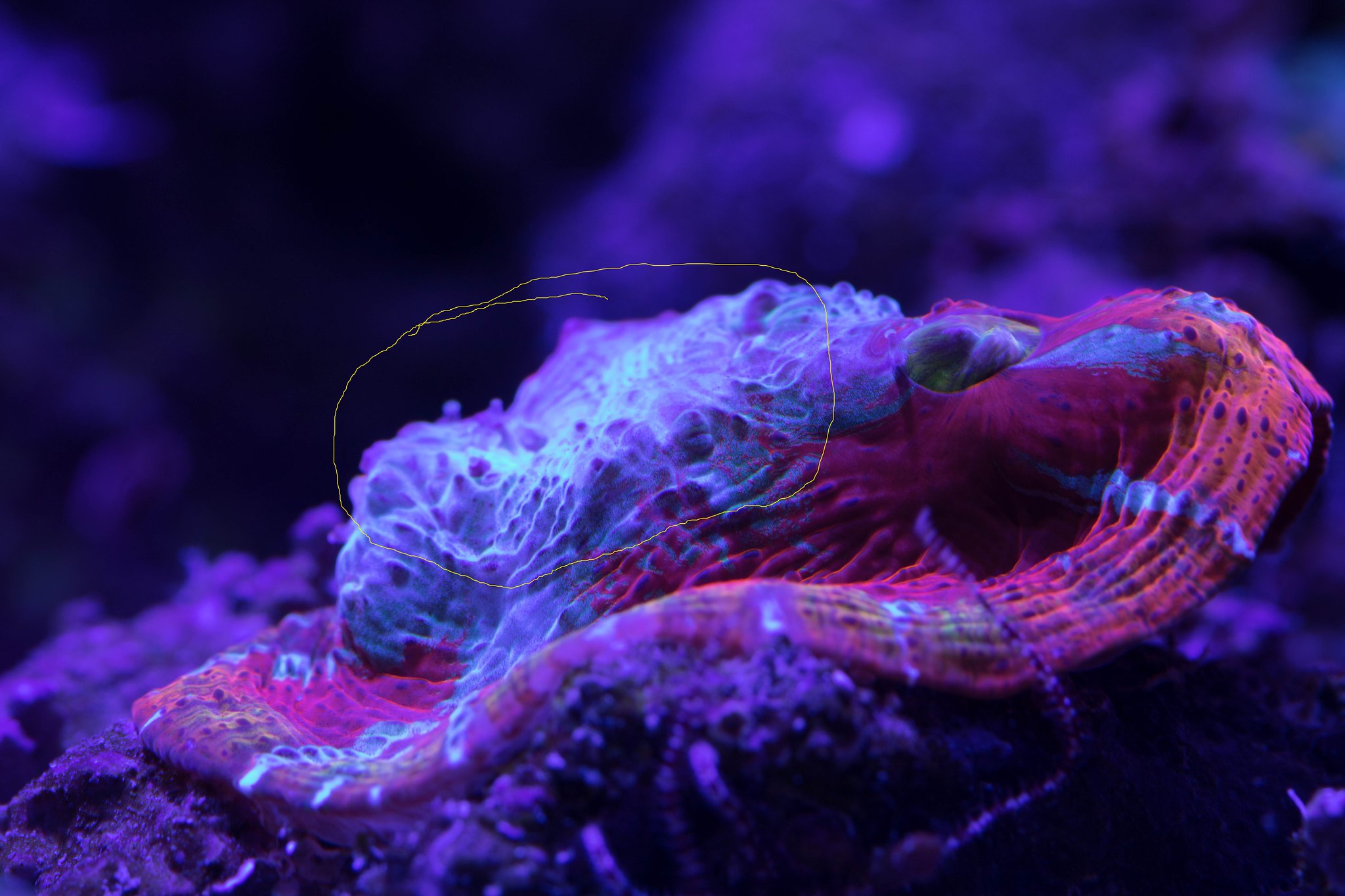
Sorry, I've circled in yellow the area I'm talking about.

avenger 4-1 by Peter Young, on Flickr
Looks natural. Exposure is not clipped at all.
If you are not fond of it, use the dodge and burn tool and play with it.

Imo, your right on the edge of exposing the grain from over manipulation.
Did you have to push the exposure much in post?
 
Looks natural. Exposure is not clipped at all.
If you are not fond of it, use the dodge and burn tool and play with it.

Imo, your right on the edge of exposing the grain from over manipulation.
Did you have to push the exposure much in post?

Only post I did was to adjust color temp. Guess I need to get on Youtube and learn a little about dodge and burn :). The shot is pretty true to what I see with the naked eye except for that glare which is a pretty blue. Maybe I'll try and play with the color sliders and see if I can do something there too.

 
Only post I did was to adjust color temp. Guess I need to get on Youtube and learn a little about dodge and burn :). The shot is pretty true to what I see with the naked eye except for that glare which is a pretty blue. Maybe I'll try and play with the color sliders and see if I can do something there too.

Nice!
I still think the first pic looks just great.

@reeferfoxx what do you think of that shot.
 
Looks natural. Exposure is not clipped at all.
If you are not fond of it, use the dodge and burn tool and play with it.

Imo, your right on the edge of exposing the grain from over manipulation.
+1

You are on the cusp of over correcting the file. There is detail in the area of concern but the blue reflection is between over exposed and white balance. White balance is one of the main limitations with the Canon Rebel series. This is more a photography issue than post processing. You could try dimming lights a little more and raising the ISO a hair. Or running a gel filter and correcting temp that way. BTW I'm looking at this with a 12 bit eizo monitor.
 
Btw I'm not trying to be vague. For some reason work is super busy today. I think it's a great shot! Not sure what the intentions are whether internet or print but i think it would look very nice as a large print. Any smaller and you would have to raise density or brightness which would blow out the hot spot. Another exposure suggestion would be to diffuse the LED lighting more for the picture. Cheers.
 
Btw I'm not trying to be vague. For some reason work is super busy today. I think it's a great shot! Not sure what the intentions are whether internet or print but i think it would look very nice as a large print. Any smaller and you would have to raise density or brightness which would blow out the hot spot. Another exposure suggestion would be to diffuse the LED lighting more for the picture. Cheers.
Glad your buisy.
Great insights. Thank you.
 
Btw I'm not trying to be vague. For some reason work is super busy today. I think it's a great shot! Not sure what the intentions are whether internet or print but i think it would look very nice as a large print. Any smaller and you would have to raise density or brightness which would blow out the hot spot. Another exposure suggestion would be to diffuse the LED lighting more for the picture. Cheers.

No worries, my work is slamming too. I'm shooting primarily for my own enjoyment, and to share on this forum. I'm really starting at the beginning and trying to learn how all the tweaks I make (ISO, F-stop, aperture, etc) change the look of the shot. I appreciate any and all criticism/ suggestions. Thanks for the feedback.
 
No worries, my work is slamming too. I'm shooting primarily for my own enjoyment, and to share on this forum. I'm really starting at the beginning and trying to learn how all the tweaks I make (ISO, F-stop, aperture, etc) change the look of the shot. I appreciate any and all criticism/ suggestions. Thanks for the feedback.
I will say you are starting off better than some pros I work for lol
 
Thanks, that's very kind.
You're very welcome.

I know some personal photographers that started that strive for a perfect image with raw files. Very understandable. Though, with reef pics, you're gonna have to make adjustments. Sometimes it can be similar to video where lighting is dim and exposure is enough to keep it from being under exposed. This gives us the ability to lighten the image and make gamma, contrast, and other low to high adjustments. Color can be adjusted too. Don't think that making corrections is bad but exposure and whute balance are the two main important aspects to any capture. Keep playing with the settings, lighting, placement etc etc Eventually you'll find what works best. Good luck!
 

IF YOU HAD TO TAKE A REEFING EXAM, WOULD YOU PASS?

  • Yes!

    Votes: 32 45.7%
  • Not yet, but I have one that I want to buy in mind!

    Votes: 9 12.9%
  • No.

    Votes: 26 37.1%
  • Other (please explain).

    Votes: 3 4.3%

New Posts

Back
Top