Help! My account won't stay logged on.

  • Thread starter Thread starter glb
  • Start date Start date
  • Tagged users None

glb

7500 Club Member
View Badges
Joined
May 12, 2013
Messages
8,141
Reaction score
3,367
Location
Miami
What state or country do you live in
Florida
Rating - 0%
0   0   0
I use the website on my iPhone and iPad. Even though I check off "stay logged on", I have to log every single time. How can I fix this???

 
I use the website on my iPhone and iPad.

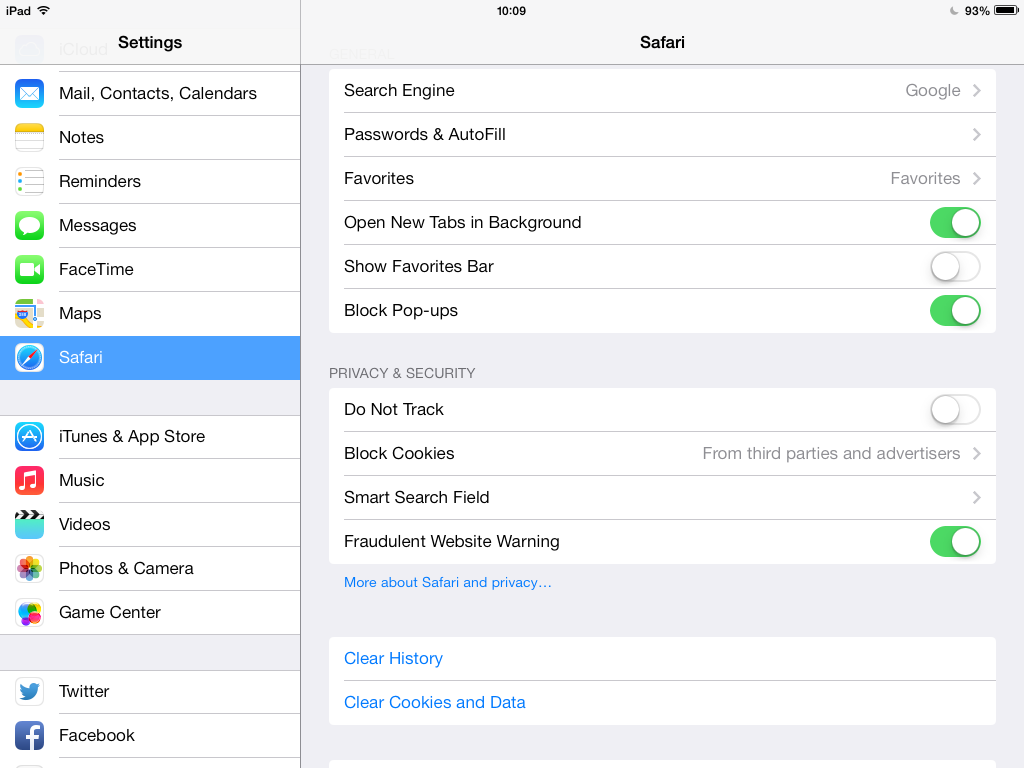
Go to the passwords and auto fill option... (2nd line down screen shot below) and select remember passwords and the auto fill option.
QlWEw.png
 
Last edited:
iPhone - it's in the following locations...
ImageUploadedByREEF2REEF1458427766.996962.jpg

Turn on the auto fill and let it used to contacts in your passwords.
 
It used to stay logged in and now it doesn't. If turn on that auto-fill will it do that for all my paswords? I don't want to do that on my phon for security reasons. I'm confused!
 
Ok my screens looked slightly different than the ones posted, but I did add r2r to my password section. I didn't see a prompt that says 'remember passwords'. My phone's a 6. When I go to the site, I still have to log in. Does anyone have any thoughts about why?
 
I don't know why but this happens to me when I use my iPad, not every time, just enough to be annoying. The settings say auto fill is on...so no idea why it's happening
 
Ok my screens looked slightly different than the ones posted, but I did add r2r to my password section. I didn't see a prompt that says 'remember passwords'. My phone's a 6. When I go to the site, I still have to log in. Does anyone have any thoughts about why?
If you close Safari every time you try to log back onto the website, and once you click/press on the log on in username field you should get the below screens.

ImageUploadedByREEF2REEF1458562090.535862.jpg


Then you just need to press on the auto fill, go.

ImageUploadedByREEF2REEF1458562112.010580.jpg
 
Still having this issue?
 
Still having this issue?
My iPhone has auto-fill working now but it still doesn't stay logged on if I leave safari. My iPad has an earlier iOS and I can't figure out how to add a password on it. It's weird, I used to be able to check off "stay logged in" and that was all there was to it. Has the website changed?
 
V
I don't know why but this happens to me when I use my iPad, not every time, just enough to be annoying. The settings say auto fill is on...so no idea why it's happening
Very weird. My iPad and iPhone have slightly different menus because the iPad has an earlier iOS. I can't figure out how to save a password on the iPad.
 
Do you have always allow cookies turned on?
ImageUploadedByREEF2REEF1458582315.746357.jpg

Also if you don't have it on please enable it, clear out your history, and make sure you're not set to private browsing.
 
Blocking cookies, and setting the browser to private will make you logon every time you visit.
 
Glad you figured it out.:)

This might help others if they need to turn it off...


For Turn Off Private Browsing for iOS 8 Devices
Step 1.
Open Safari browser on your iPhone, iPad or iPod touch
Step 2. Than Tap on double square box icon

Step 3.
Now, Tap Private to Turn Private browsing Mode Off

For iOS 7 or earlier User– How to Turn Off Private Browsing On iPhone
  • Open safari Browser on iPhone, iPad or iPod touch
  • Now Tap on plus icon to open new tab
  • Last Tap on Private to Turn Private Browsing Off.
 
Glad you figured it out.:)

This might help others if they need to turn it off...


For Turn Off Private Browsing for iOS 8 Devices
Step 1.
Open Safari browser on your iPhone, iPad or iPod touch
Step 2. Than Tap on double square box icon

Step 3.
Now, Tap Private to Turn Private browsing Mode Off

For iOS 7 or earlier User– How to Turn Off Private Browsing On iPhone
  • Open safari Browser on iPhone, iPad or iPod touch
  • Now Tap on plus icon to open new tab
  • Last Tap on Private to Turn Private Browsing Off.
Who knew??? Lol. I'm sure I didn't turn it to private on purpose. Glad to be a R2R PSA.
 
I just checked the iPad and it was on private too. I turned private off and now I got the prompt to save my password. Thanks everyone!
 
Ok my problem seems to be solved. I hope everyone else is able to figure out theirs.
 

IF YOU HAD TO TAKE A REEFING EXAM, WOULD YOU PASS?

  • Yes!

    Votes: 32 45.7%
  • Not yet, but I have one that I want to buy in mind!

    Votes: 9 12.9%
  • No.

    Votes: 26 37.1%
  • Other (please explain).

    Votes: 3 4.3%
Back
Top