Need help/advice with my Nikon D3200

  • Thread starter Thread starter GRIFTY
  • Start date Start date
  • Tagged users None

GRIFTY

Community Member
View Badges
Joined
Jan 8, 2015
Messages
86
Reaction score
42
Location
Canada
Rating - 0%
0   0   0
Is there anyone out there that can help me out with what my best choice for settings would be. I have a basic understanding of the settings and my camera but can't seem to get any photos to work for me.
I have the Nikon D3200. So any help would be greatly appreciated or tell me what you use for your 3200.
Thanks guys!
 
I have been playing with my new D3300 and here is what I have learned.

Very fast shutter, with iso 100 will help remove the ghostly blue over tones. Start with the highest shutter speed and work down. You may have to bump up your iso as well.

White balance cloudy adjust to orange on the grid.

I am just learning but it seems my best photos are when I limit the amount of light hitting my camera by increasing shutter speed and reducing aperture and adjusting iso until I get the picture just bright enough.
 
I have been playing with my new D3300 and here is what I have learned.

Very fast shutter, with iso 100 will help remove the ghostly blue over tones. Start with the highest shutter speed and work down. You may have to bump up your iso as well.

White balance cloudy adjust to orange on the grid.

I am just learning but it seems my best photos are when I limit the amount of light hitting my camera by increasing shutter speed and reducing aperture and adjusting iso until I get the picture just bright enough.

I can get pretty decently clear pictures the problem I'm having is the blues from my LEDs make everything seem blue and the best part of a reef is capturing the colour.. Any tips for the besides filters or turning my blues off?
 
There's a thread on here talking about white balance I think from battle corals. I tried it out with adjusting custom white balance, but it still didn't work out for me. I'll try to find the thread, and post the link in here.
 
LEDs are very tough to get good photos off the camera itself. Meaning, it takes a lot of editing after you take the photo to get rid of the crazy blue. Here's what usually works for me...
First, shoot with all your lights on (daylights and actinic).
Settings
Manual or Aperture priority
ISO 100 is okay, but using the auto setting is what I use and can help if your lights aren't that bright. Limit it to iso 1200 or so to avoid grainy photos later
White Balance (custom setting, change it to the highest kelvin it will go, usually 10k). Not all that important though because it needs to be adjusted after anyway
F 11 (can be anywhere from 8-13 for best depth of field and good sharp images)
Shutter speed (at least 1 over the focal length of your lens, meaning if you're using a 100mm lens, use at least a 1/100 shutter speed)

Tips: 1. Shoot in RAW. This is key. It allows you to use editing software to adjust the white balance after you get the images on your computer
2. This one is also very important IMO...Pay attention to your camera's light meter. You want to slightly under expose the pictures (by at least 1 stop). The dial on your light meter should be slightly to the left of center;)
3. Use an editing program (doesn't have to be photoshop) to adjust your exposure, highlights, shadows, and white balance. This is the tricky part and just takes a lot of trial and error to get a photo to look good and natural. Too big of a topic to summarize here. Post your photos here for us to review and critique!
 
Oh and in reference to the link above, that may work for you if your camera allows custom white balance. In my opinion those pics still need a lot of adjustment, but it is definitely an improvement over using auto WB. I have not tried that setting on my camera yet, but I probably will try it to see how it works.
 
I was fooling around with my camera and took some of these before I read any of your suggestions hatfielj. I had to make them smaller to upload I hope that didn't change anything with the picture itself. Anyway here is my first crack at it. I only cropped the photos did not edit them.
DSC_0317.jpg
 
Here are the settings I had for the picture. What needs to change?
image.jpeg
 
I was fooling around with my camera and took some of these before I read any of your suggestions hatfielj. I had to make them smaller to upload I hope that didn't change anything with the picture itself. Anyway here is my first crack at it. I only cropped the photos did not edit them.
DSC_0317.jpg
quite grainy to me. What settings did you use for this shot? If your shooting with the camera hand held, try this. Shoot under AV mode. Then put ISO on 1600 and F stop on F5.6 and shoot away leave white balance and everything else on auto. if your going to shoot under pure actinics then your going to have to create a custom white balance. . let me know the results. I know most say to run low ISO on here . But i find it difficult to run such a low ISO without using a tripod.
 
This is with the settings you posted Reef_a_holiks. it seems a tad grainy because I still have everything in the tank running and have a very fine sand so there is some very small bits floating around the water column also which could be messing with the picture.

DSC_0329.JPG
 
This is with the settings you posted Reef_a_holiks. it seems a tad grainy because I still have everything in the tank running and have a very fine sand so there is some very small bits floating around the water column also which could be messing with the picture.

DSC_0329.JPG
That looks alot better! still needs work but alot better. try bringing down ISO to 800, put F stop at 8 instead of 5.6, try staying still and shoot when you see the fish are paused for a second. Your almost there.

Are these shots under only blue lighting?
 
I'll keep plugging away..
No it's blues and whites that I have on. The percentages change through out the day
 
Yeah I agree, ISO is way too high, limit it to no more than 1200-1600 on that camera. That's where the grainy look is coming from. Also set your aperture to at least 8 in my opinion (most lenses perform best in terms of sharpness at smaller apertures). With these changes (if done in aperture priority mode) your shutter speed should go down a lot, which is why its important to turn off your pumps so things aren't moving. Remember to not let your shutter speed go too low or you'll need a tripod (on that lens I would keep shutter speed at least 1/100 to prevent movement blur). You're "EV" which is your light meter should be a little less than 0. That will help prevent your sand from looking so white and washed out. Try not to crop if you can help it. You lose a lot of megapixels doing that which makes things look less sharp.
You won't be able to take fish photos with these settings though. For that a flash is best IMO in order to be able to freeze the movement.
Just keep trying. Use a bunch of different settings and pay attention to how each photo changes with the setting. You'll find a sweet spot.
 
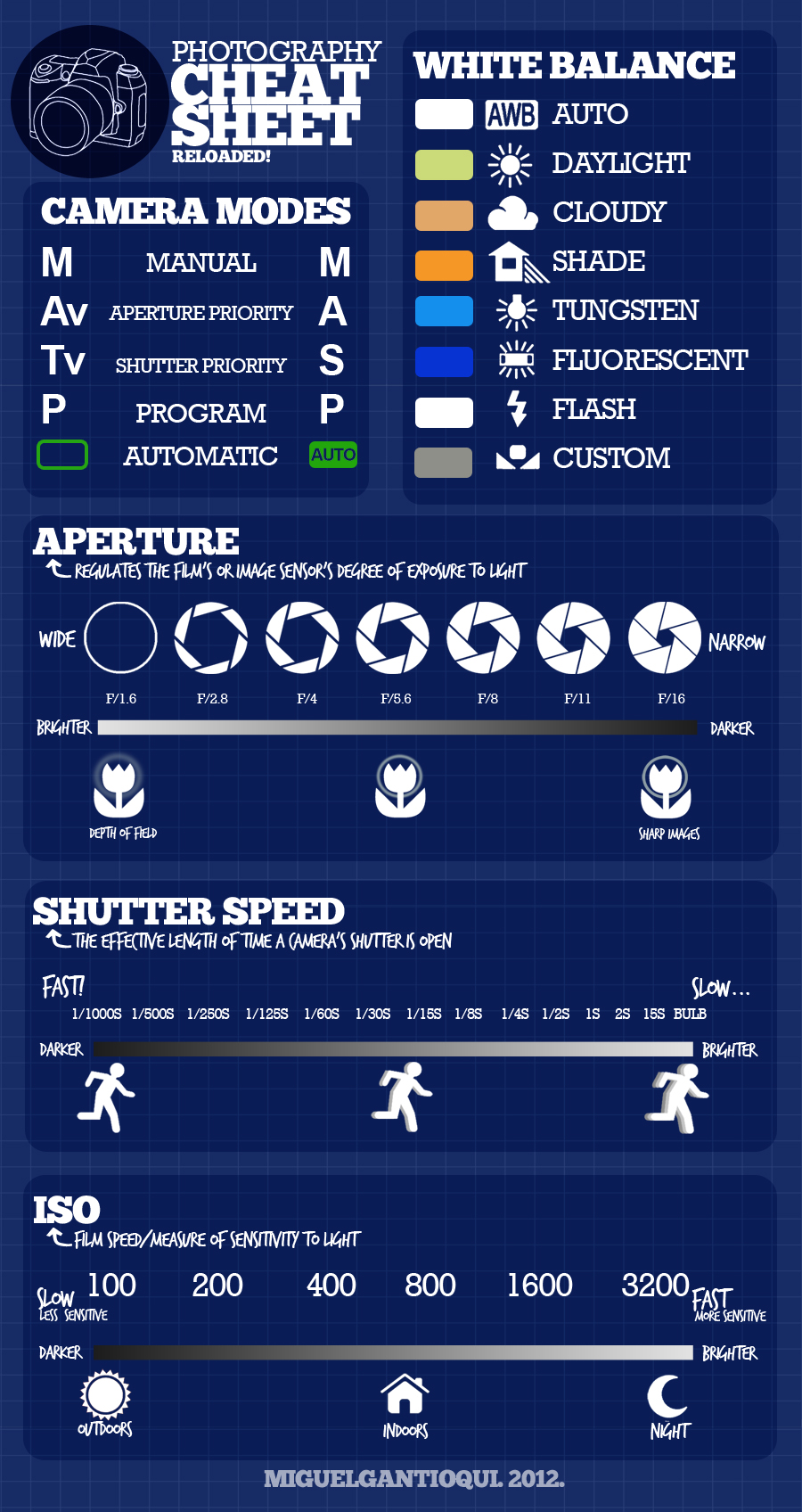
In order to use any camera, you must learn the basics of how to use it. Even though this camera is considered an entry-level DSLR, it is still NOT an out of the box instant great photos. The sames goes for intermediate and professional DSLRs. You must learn about Aperature, ISO, Shutter Speed, White Balance, Focusing, and Depth of Field to name a few. Look at these images from Google below for a quick idea of what I am referring to:

photography-shutter-speed-aperture-iso-cheat-sheet-chart-fotoblog-hamburg-daniel-peters-11.jpg


Aperture-depth-of-field-photography-cheat-sheet.jpg


02-3-elements-of-exposure-crop.jpg


comohacerfotografias.jpeg
 
Yeah I agree, ISO is way too high, limit it to no more than 1200-1600 on that camera. That's where the grainy look is coming from. Also set your aperture to at least 8 in my opinion (most lenses perform best in terms of sharpness at smaller apertures). With these changes (if done in aperture priority mode) your shutter speed should go down a lot, which is why its important to turn off your pumps so things aren't moving. Remember to not let your shutter speed go too low or you'll need a tripod (on that lens I would keep shutter speed at least 1/100 to prevent movement blur). You're "EV" which is your light meter should be a little less than 0. That will help prevent your sand from looking so white and washed out. Try not to crop if you can help it. You lose a lot of megapixels doing that which makes things look less sharp.
You won't be able to take fish photos with these settings though. For that a flash is best IMO in order to be able to freeze the movement.
Just keep trying. Use a bunch of different settings and pay attention to how each photo changes with the setting. You'll find a sweet spot.
Cant say it any better! Agreed!
 

IF YOU HAD TO TAKE A REEFING EXAM, WOULD YOU PASS?

  • Yes!

    Votes: 32 45.7%
  • Not yet, but I have one that I want to buy in mind!

    Votes: 9 12.9%
  • No.

    Votes: 26 37.1%
  • Other (please explain).

    Votes: 3 4.3%
Back
Top