which webcam?

Hi all Are there in WiFi camera experts out there, all of these say they do not support 5 GH networks and that's what my WiFi is and I don't get a great cell phone signal in my house. Was wondering what I should get?
Not an expert but if you can setup your home wifi for a non-5ghz connection also, just log on to that to connect to wifi on the device then it will carry the signal. My apple router has both a 5ghz signal and the other one broadcasting all the time.
 
In my opinion, I use the NEST WebCam so I can see in and around my sump area. I think they are the best on the market currently. They are not cheap but very user-friendly , they are plug and play and the quality is outstanding. All you do is log into there website and boom you're connected to your webcam. Also, you can check it on your Andriod or Iphone from anywhere in the world plus you can go wireless or hardwire.. Nest WEBSITE: https://nest.com/camera/meet-nest-cam/


Screen Shot 2017-05-03 at 8.40.50 PM.png
 
Nest are costly but the cloud option is nice. You can also look for other cloud cameras. Just know most off-the-shelf cameras have hard coded back door account information. Personally I purchase a cheap PTZ and setup a VPN to access it but I do work in IT. If you can flip the bill I would really look at Nest cause they do make good products but they cost money
 
Yea, but you get what you pay for which is top quality! I paid $199.000 for mine but to me, it's worth every penny since I can talk to my dogs through it and move it around. What I like about the nest you can just plug it right into a plug or power strip and you are good to go.. Take a look and see how clear of the quality of the Nest Cam gives you..

Screen Shot 2017-05-03 at 10.17.04 PM.png
 
IMHO nest is overpriced but good for non-tech users. Then again many of the cams nowadays have simple setup via QR code or apps.
 
I'm using the Foscam PTZ. It has night vision and I have it setup to send both audio and motion alert emails if I choose to. I bought it just for that reason...vacations.
 
Simple answer and solution. It has a free cloud access where you can access your cam anywhere. Decent 108o video looks more like 720 but fine for the application. Assuming you're not concerned about China hacking your camera and watching your tank... best part? It has a magnetic base that will attach itself to a powerhead magnet. For about $25-30... why not.

IMG_4306.PNG
 
if the blue bothers you when it's just the blue lights on, or really heavy blue, i wonder if you put a piece of yellow cellophane or candy wrap like from a butterscotch pierce of hard candy in front of the lens would maybe help. I use a pair of yellow safety glasses in front of my iPhone when I take pictures and it takes all the blue away. try it, it's great.
 
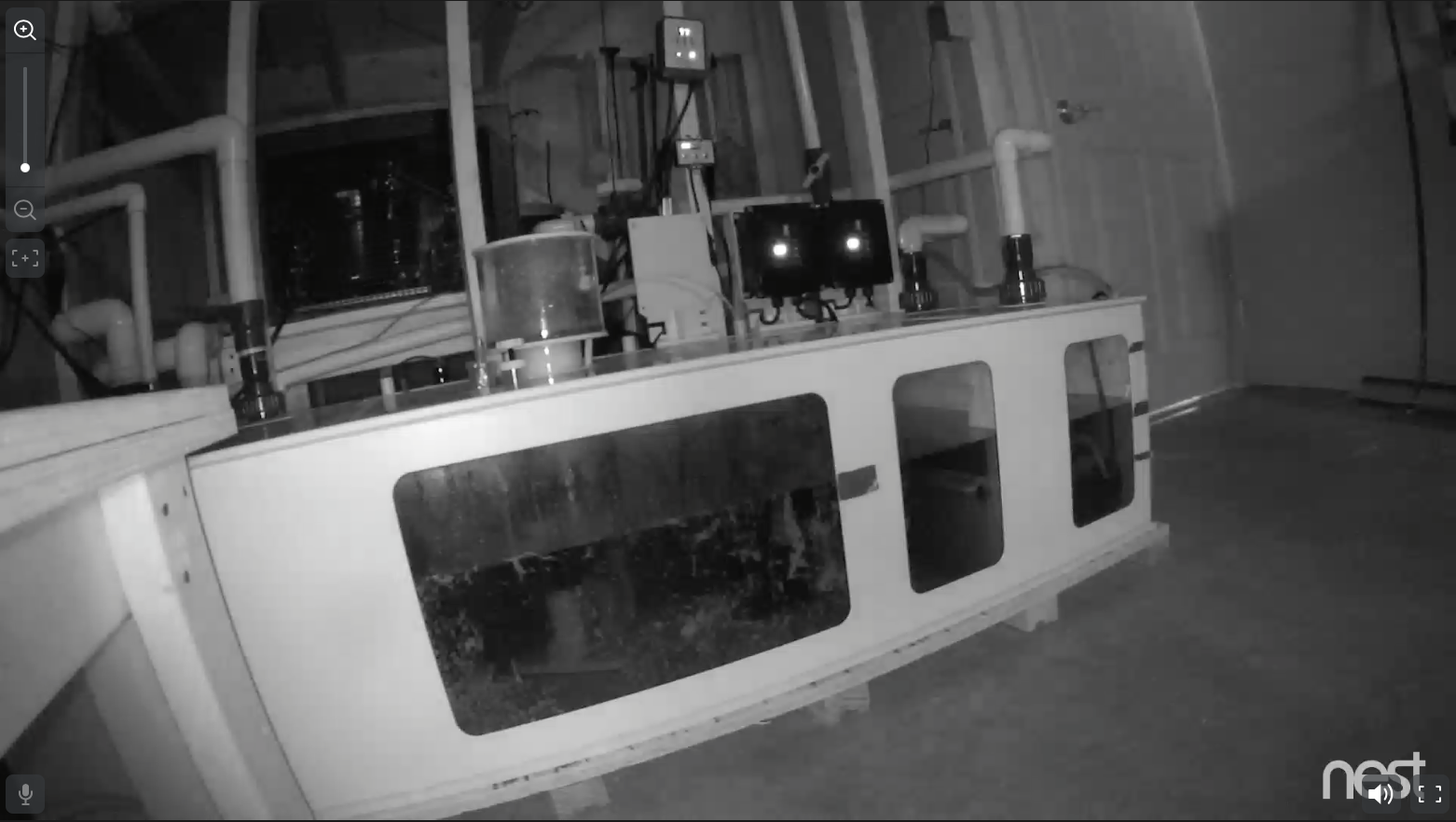
I use the Nest Cam to monitor my sump when I am away. I have it hooked into my APEX so I have it off all the time and can turn it on remotely when I need it, which is nice since the camera does get hot when it is on for a while. One thing I really like about it is the infrared......the below picture is from my sump room and there were no lights on in the room when this screen grab was taken. I can see the water level in the sump, skimmer cup and a couple of other things.

Screen-Shot-2017-05-04-at-7.05.02-AM.png
 
Going on vacation for two weeks tom. I bought and set up the guardzilla from best buy . It is like 99.00 and will surfice for just looking and my tanks to check simple stuff . Pretty easy to set up and use .
 
Assuming you're not concerned about China hacking your camera and watching your tank..

You don't need to worry about them just watching your tank but also using the camera as a gateway into your network and other devices.
 
I am working on building my own controller out of a raspberry pi. One of the options I am thinking about adding is a webcam and have different options base around having a webcam.
 
How are you going to connect to it remotely? If you are going to do port forwarding just be mindful if you can access it so can hackers. If your camera isn't a cloud camera you can setup a home VPN to help secure the connection. Also make sure you change passwords and ports if you can. This is from 2014 but people still leave settings as default - http://www.networkworld.com/article...rity-cameras-thanks-to-default-passwords.html
Any good how to's on this? I currently run multiple ip cameras. I have designated ports and do not use the default password but am always looking to make sure what I am doing is good enough to let me in but keep others out.

I use dlink 920, 930,and 932 cameras in my house/tank set up. They are decent but not great.
 
You can always check out a VPN software like OpenVPN https://openvpn.net/. I set up a pfsense box at home and used OpenVPN. This allowed me to access my home network, from my phone and computer. It makes your device look like its on your network. I had the DLink DCS-5009L. It worked fine for me even though I did have small issues with the PTZ controls. I have not done this in awhile (I moved and no longer have my own network so I don't remote into it) but might be working on something soon as I work more and more on my own controller that I am building.

If your not tech savy I suggest a cloud camera. Worst thing you can do is port forward but many people do that as well
 
Hi all Are there in WiFi camera experts out there, all of these say they do not support 5 GH networks and that's what my WiFi is and I don't get a great cell phone signal in my house. Was wondering what I should get?

This is the camera I went with, 5GHz wireless and 4MP camera with an optical zoom instead of the more common 2MP digital zoom only. I found the 2MP cameras I tried weren't high enough video quality for what I wanted.

https://www.amazon.com/Reolink-Wi-F...TF8&qid=1494007325&sr=8-1&keywords=reolink+c2
 
As an Amazon Associate we earn from qualifying purchases.

IF YOU HAD TO TAKE A REEFING EXAM, WOULD YOU PASS?

  • Yes!

    Votes: 32 45.7%
  • Not yet, but I have one that I want to buy in mind!

    Votes: 9 12.9%
  • No.

    Votes: 26 37.1%
  • Other (please explain).

    Votes: 3 4.3%

New Posts

Back
Top